Friday, November 18, 2011

Transfer Table Staging-Part III

Continued from: Transfer Table Staging-Part II

Last night I fixed the wiggle. I started by taking apart the shelf. Then I took a right-angle to the rails and realized that they weren’t exactly 90 degrees to the wall. There was almost 3/16th of an inch difference between the front and the back.

So, I ran to the hardware store and bought a set of sturdy, 4" L-brackets. I used these to attach the saddle and the bracket with it to the wall, making sure that they were jutting out at exactly 90 degrees.

This really made it sturdy as a rock! No wiggle left whatsoever. Yaaay!

I then had to remove the rail from the bottom of the shelf because as assembled the rails no longer lined up. After careful measuring and reassembly, the shelf is back in business with no wiggle at all. It slides in and out great. I gotta grease the bearings again though as most of the grease ended up on my hands, and soon after on my pants.

Now I'm ready to buy and assemble the drive mechanism. That's a December project though, so until then I plan to build the bench work for the section to the right so I can get ready for the approach track alignment.


Thursday, November 17, 2011

Transfer Table Staging–Part II

Continued from: Transfer Table Staging

I plan to motorize the operation of my transfer table. There are many ways to do this. One option is to use a stepper motor to drive a screw and use a controller to set precise locations for each track index. This is a very advantageous approach as it provides great precision and you can control the speed, acceleration and deceleration of the drive mechanism. If you are interested in doing this, probably the simplest/cheapest option would be to use an Arduino board. They have examples for controlling a stepper motor and a full library for controlling stepper motors.

But, I didn’t want to deal with the complexity of electronics and controllers. So, I’m going to go with a network of switches and sensors. 

Let me first start with what I want the end result to look like.  I want to control the staging transfer table with a control panel that looks like this:
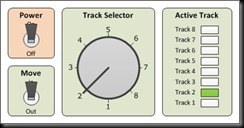
Transfer Table Control Panel Concept

You turn the power on, and then select a track using the rotary switch. Then you move the table using the rocker switch. The table moves until the selected track is aligned and then it stops. When a track is aligned, it receives power, all other tracks are dead. The track that receives power is indicated with a lit LED on the control panel.

To achieve this, I'm going to use on/on DPDT switches for each table location. The reason why I want to use DPDT is because I want to use the same sensor/switch for supplying and shutting off power to the tracks. One pole of the DPDT will be used for the drive mechanism running 12v DC, and the other pole will be used for controlling the DCC power to the tracks which is AC.

The rotary switch is going to be used to select only one route for power to the actuator. The way I'll wire the DPDT switches will be so that it'll act like a normally closed circuit, as in current will flow only if the table isn't currently on that index. For example, I'll set the rotary switch to track 1. That means the only power path for the actuator goes through the DPDT sensor switch at position track 1. Now, if the table isn't currently aligned with track 1, the current will flow and I'll be able to operate the actuator using the rocker switch. Once the table aligns with track 1, then the DPDT sensor switch will throw and current won't flow. The only way one can move the table again is by selecting a different track with the rotary selector switch.

The reason why I decided to use DPDT sensor switches is as I said I wanted to be able to use the same switch for controlling track power. I needed the track power to be only on when the track is aligned and the drive power to be only off when the track is aligned.

Here’s the complete wiring diagram:

Transfer Table Wiring Diagram_Full

The only option for a DPDT sensor switch I could find was this:
http://search.digikey.com/us/en/prod...1418-ND/483974

So, I started looking for alternatives. One possibility is to use regular SPDT switches for the sensors, for which there is a wide variety, and SPST relays to control track power.  I guess I have some tinkering to do.


Wednesday, November 16, 2011

Transfer Table Staging

Ample staging is my top priority for the new layout that is about to begin. I’ve toyed with several ideas from standard staging yards, to train elevators, to cassettes.  Cassettes actually work pretty well, and that is what I use for staging on my small layout, TWR.

For the room-sized layout I’m about to embark on, I have decided to go with a staging drawer, or transfer table staging. This concept isn’t new; it is covered in many posts at late Carl Arendt’s wonderful site. Also, here are a few of the fine implementations of the idea:

http://www.3fengel.de/en_layout-Dateien/Page429.htm

http://cs.trains.com/TRCCS/themes/trc/forums/thread.aspx?ThreadID=87087

The Mega Drawer:

And the crazy, double deck, fully automated staging yard:

My design is going to be simpler than that.  I’m planning to have only 8-10 tracks, that are 40” long each. Something that looks like this:

2-Phase 1_Staging Design

The advantages of this system are:

  • Operationally, it is a 10 track, double ended yard, with each track the same length
  • Eliminates the cost of turnouts, frog juicers, turnout controllers etc.
  • The drawer can fully slide out, so derailments and maintenance can be performed when fully extended. This allows the staging shelf to have minimum vertical clearance (about 2.5” in my case)
  • Maximum capacity in small footprint/

Of course it’s not all positive.  The downsides are:

  • Complicated benchwork.
  • Indexing/track alignment is difficult.
  • The additional cost of drive mechanism etc –> although this is sort of a wash by the savings from the turnouts.
  • Sort of an unconventional way of doing things, so unforeseen issues may arise.

The layout which this staging is going to serve is going to be an around-the-walls shelf type layout. I had already decided to use track shelving to hook the layout to the walls. Phase I is going to be just building the transfer table staging. So far, I've attached the tracks for the shelving, two brackets, bracket saddles (as I've seen in Iain Rice's book), the drawer slides and the transfer table itself. I think I'm going to redo the saddles though as they still wiggle which affects the function of the transfer table. I was surprised to see that even with double-track shelving, the bracket still wiggles.

Anyways, here are a few pictures showing where I’m at currently:

DSC00038

DSC00040

DSC00041

DSC00042

DSC00043

DSC00044

DSC00045

And finally, here’s a video showing the current state:


Thursday, September 22, 2011

Getting ready to say goodbye

After years (literally) of planning, scheming, pondering, I finally realized that the old layout I have is just way too different than what I want to do nowadays.  I tried hard to incorporate that into various new designs, but in the end a fresh start is the only way to go forward.

So, next time I have some free time, I’ll be tearing this baby apart.  It’s hard, because it is the very first N scale layout I ever built on my own.  It also has been moved, without damage, from Michigan to New Jersey, and then from New Jersey to the west coast.  What I’m saying is I’m emotionally attached to the darn thing.

Anyways, I obviously will save all the structures.  I’m going to save the major land forms (hills etc) as well, in hopes that I can reuse them somewhere.  The track is going to be sold as is, since I decided to go with code 55 for the next layout. 

Here are a few pictures of the final state of the layout:

In its place, I’m planning a double deck (disjointed) layout.  The upper deck will be loosely based on the Alaska Railroad.  The lower deck will be much larger and will be loosely based on UP in the Cascades. 

So long old friend, and thanks for all the good times!

Technorati Tags: ,